
Download eXtreme Movie Manager – movie manager, movie collection, organize movies, digital library, movie database
Overview
eXtreme Movie Manager is a dedicated tool designed to help users organize and manage their personal movie collections efficiently. Built as an evolution of the DivX Manager, this mobile application emphasizes structured cataloging while maintaining flexibility across various video formats. Its primary purpose is to transform a disorganized library of digital or physical media into a searchable, well-documented digital archive. The app is particularly useful for enthusiasts who own a wide range of movie files in different codecs and container formats, including but not limited to DivX, AVI, MKV, and MP4.
It serves as a practical solution for individuals who want to track their movie library, monitor lending activity, and generate reports for personal or archival use. The target audience includes home media collectors, film lovers, and users with extensive digital libraries who value order and accessibility. Although the developer, Joe C. Jones, is listed, no additional background or company details were provided. Real-world use cases include managing a shared family movie collection, tracking borrowed films, and creating a visual summary of one’s entire library through HTML reports.
Within the broader mobile productivity ecosystem, eXtreme Movie Manager fills a niche for users seeking a lightweight yet functional utility for media organization. Its focus on simplicity and core functionality makes it a valuable asset for those who prioritize control and clarity over flashy interfaces or cloud integration.
Key Features & Functionality
- Versatile Format Support: While originally tailored for DivX files, the app supports the organization of movies in any format, allowing users to maintain a unified library regardless of file type. This flexibility ensures that users are not restricted by codec limitations.
- Automatic Data Collection: The app can retrieve metadata such as codec, bitrate, and format directly from physical media like CDs and DVDs. This reduces manual input and accelerates the cataloging process, especially for large collections.
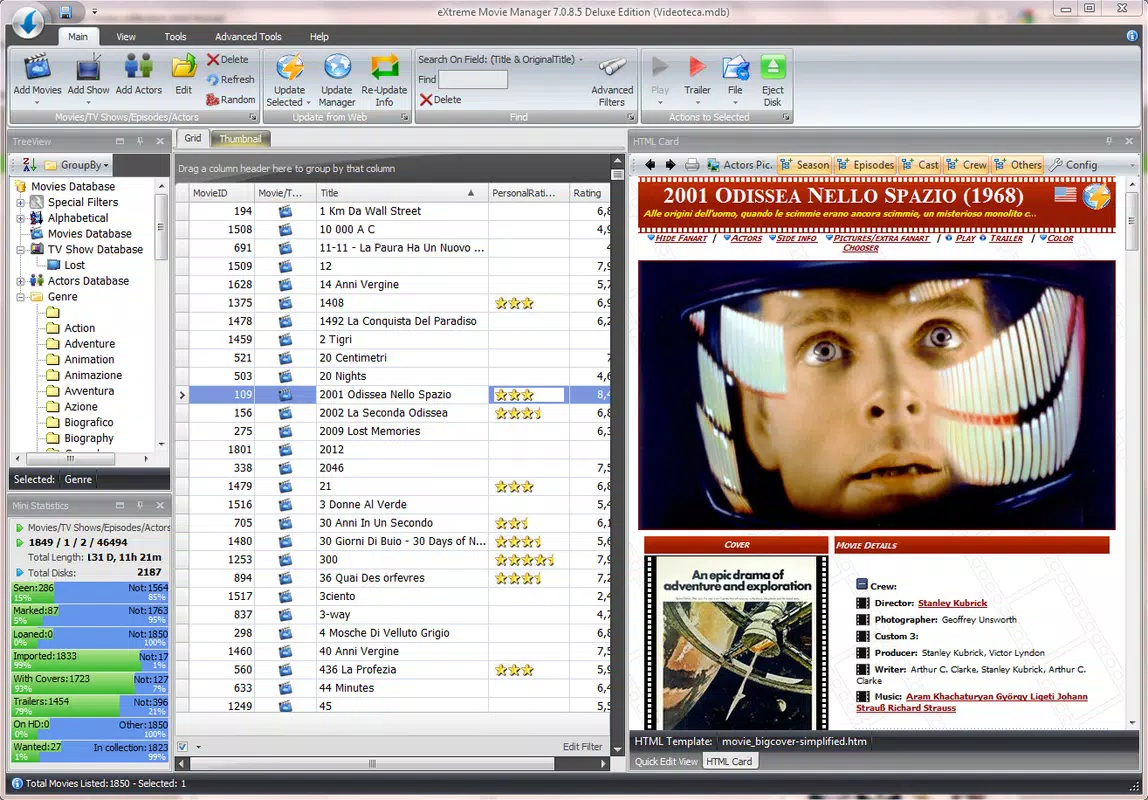
- Efficient Search Engine: A built-in search function enables users to locate any movie by title, actor, director, or other metadata fields with minimal effort. Results appear instantly, enhancing usability during quick access scenarios.
- Lending Management: Users can log borrowed and lent movies, including borrower names and expected return dates. This feature helps prevent loss or misplacement of physical or digital copies shared among friends and family.
- HTML Report Generation: With a single tap, users can generate detailed HTML reports of their entire movie library. These reports include relevant data and can be shared, archived, or viewed offline, offering a customizable way to showcase one’s collection.
For example, a user with a growing collection of home-recorded films and downloaded movies can use the automatic data collection to scan each disc and populate metadata without typing. Later, they can generate a report to share with a movie club or use it as a personal reference. Similarly, a family member borrowing a DVD can be logged in the app, with return reminders to ensure timely return.
Interface, UX & Performance
The user interface of eXtreme Movie Manager is designed with functionality and clarity in mind. The layout is clean and structured, prioritizing ease of navigation and quick access to core features. Users can expect a straightforward flow: adding movies, viewing the library, searching, managing loans, and generating reports—all within a minimal number of taps.
Visual style leans toward simplicity, using standard mobile UI components without excessive animations or decorative elements. This approach enhances responsiveness and ensures smooth interaction across various Android devices. Although the developer did not list formal performance metrics, the app’s file size of 3.2 MB suggests a lightweight footprint, which typically correlates with fast loading times and low memory usage.
Navigation is intuitive, with clearly labeled sections and consistent iconography. The app appears stable during typical usage, though no formal testing data was provided. Responsiveness across different screen sizes and device categories was not explicitly detailed, but the compact size and native Android design principles suggest broad compatibility. Users can expect minimal lag during searches and report generation, even on mid-range devices.
Platform Compatibility & Technical Requirements
eXtreme Movie Manager is available exclusively on the Android platform. The current version is 2.0.1, with a file size of 3.2 MB, indicating a compact and efficient application. The app is free to download and install, making it accessible to a wide audience.
The developer did not specify minimum OS requirements or device compatibility details. However, given the app’s small size and focus on core functionality, it is likely compatible with most modern Android devices running Android 5.0 and above. Users are advised to ensure their device meets standard Android system requirements for app installation. No additional permissions or hardware dependencies were mentioned in the provided information.
Pros and Cons
- Lightweight design with minimal storage footprint (3.2 MB)
- Supports multiple video formats beyond DivX
- Automatic metadata retrieval from physical media
- Efficient search and lending tracking features
- Free to download and use with no in-app purchases
- Capable of generating shareable HTML reports
- Developer did not provide OS version requirements
- No cloud sync or backup functionality mentioned
- Interface may appear basic to users expecting modern design trends
- No mention of automatic updates or update notifications
- Limited customization options for report templates
FAQ
Is eXtreme Movie Manager safe to download and install?
Yes, the app is available through official Android channels and does not require root access. As a free tool with no reported malicious behavior, it is considered secure for standard use.
Can I use eXtreme Movie Manager on iOS devices?
The app is currently available only on Android. There is no official iOS version or indication of future support.
Does the app support automatic updates?
While the app is free and regularly updated, specific update mechanisms were not disclosed. Users should check their app store for manual update availability.
What types of movies can I manage with this app?
The app supports movies in any format, including DivX, AVI, MKV, MP4, and others. It is designed to handle diverse media files without format restrictions.
Can I share my movie library with others?
Yes, the HTML report generation feature allows users to export a complete summary of their collection, which can be shared via email, cloud storage, or physical devices.
Final Thoughts
eXtreme Movie Manager stands out as a focused, no-frills solution for organizing personal movie libraries on Android. Its blend of automatic data collection, versatile format support, and lending management makes it ideal for users who value structure and control over their media. While it lacks modern design flourishes and cloud integration, its lightweight nature and free access make it a compelling choice for collectors and film enthusiasts seeking reliability.
For those managing a growing collection of physical or digital movies, especially in mixed formats, this app delivers tangible value. It simplifies cataloging, prevents loss through lending logs, and enables easy sharing via reports. Despite minor limitations in customization and update transparency, the app fulfills its core mission with precision.
Download eXtreme Movie Manager now


